
Why it exists
Plenty of CSV apps on a phone are really viewers wearing a spreadsheet costume: they show you the first few thousand rows, then truncate the file or quietly refuse it. CSV Editor was built the other way round. Start from a file that is too big, make it open in seconds, and only then add editing, filters, charts and formulas on top. Even the free version writes back every row.
Edit like a spreadsheet
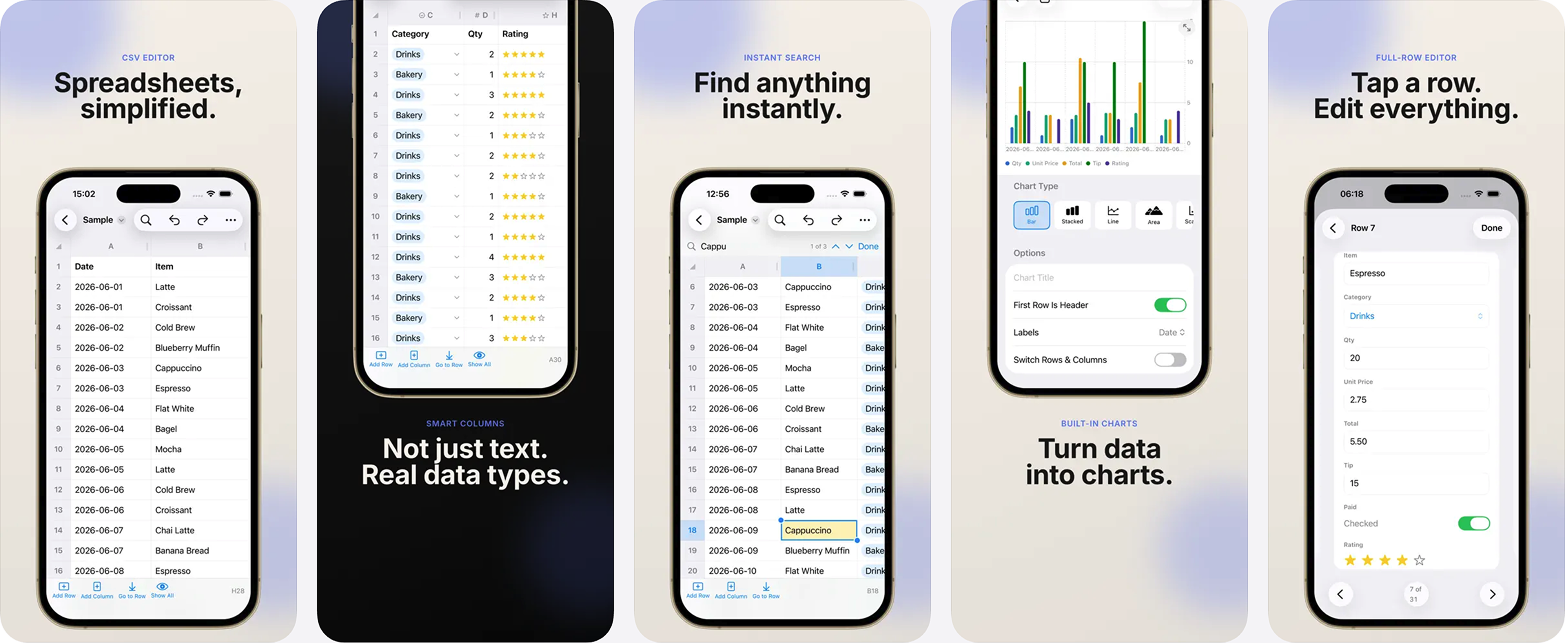
- Tap to select, tap again to edit, Excel-style on touch.
- Insert, delete, and reorder rows and columns.
- Undo and redo everything.
- Freeze rows and columns so headers stay put while you scroll.
- Select ranges with drag handles, clear whole ranges at once.
Built for big files
- Opens 500,000+ row files without slowing down.
- Background loading with live progress, so you can start reading immediately.
- Smooth flick-scrolling through the whole sheet.
Sort and filter
- Excel-style AutoFilter per column.
- Sort text, numbers, and dates the way Excel does.
- Filtered rows are protected: edits and deletes never touch hidden data.
Charts
- Turn any selection into a chart in two taps.
- Bar, line, and more.
- Save chart images to your photo library or share them.
Formula columns
- Add a computed column that fills down every row, like a spreadsheet formula.
- Reference other columns by name, e.g. [Price] * [Qty].
- Built-in functions: IF, ROUND, ABS, MIN, MAX, CONCAT, UPPER, LOWER, TRIM, LEN, CONTAINS.
- Live preview and inline error checking while you build the formula.
- Formulas save inside the CSV, so results are readable in any app.
Smart format handling
- Auto-detects delimiters, headers, and encodings.
- Opens TSV and other delimited files.
- Re-open with custom parse settings when a file is unusual.
Your file comes back whole
Your files are never truncated: even in the free version, every row of your file is preserved when you save.
Questions
- How large a CSV file can it open?
- Files of 500,000+ rows open without slowing down. Loading happens in the background with live progress, so you can start reading before the whole file has finished.
- Does the free version truncate my file?
- No. Every row of your file is preserved when you save, even in the free version.
- Can I use spreadsheet formulas?
- Yes. Add a computed column that fills down every row and reference other columns by name, such as [Price] * [Qty]. IF, ROUND, ABS, MIN, MAX, CONCAT, UPPER, LOWER, TRIM, LEN and CONTAINS are built in, with live preview and inline error checking. Formulas save inside the CSV, so the results are readable in any app.
- Does it open TSV files and unusual delimiters?
- Yes. Delimiters, headers and encodings are auto-detected, TSV and other delimited files open directly, and you can re-open a file with custom parse settings when it is unusual.
- Is it safe to edit while a filter is applied?
- Yes. Filtered rows are protected: edits and deletes never touch hidden data.
Try it in the browser
Free, nothing uploaded, no account — and a fair way to find out whether this is the kind of tool you want on your phone.
Guides
- How to compare two CSV files and find what changeddiff compares lines, so a re-sorted export looks entirely rewritten. Here is how to compare by key instead: what is new, what is gone, what changed.
- How to convert a CSV to PDFA CSV has no page and a PDF is nothing but pages, which is why columns fall off the edge. Here is how to decide what goes in before you convert.
- How to remove duplicate rows from a CSV fileMost duplicates are two records for one person rather than identical lines, and one of them is newer. Here is how to find them and keep the right one.
- How to merge multiple CSV files into oneConcatenation matches columns by position, so one file with a different header order quietly ruins the result. Here is how to merge by name, and verify it.
- Why Excel crashes on large files, and what to do insteadNot responding, frozen on scroll, dead on save. The cause is usually memory, recalculation and formatting rather than the row count. Here is how to tell which one.
- How to open a 1GB CSV file (2026 guide)A gigabyte is where most tools stop being honest about what they can do. Here is what opens a 1GB CSV, what it costs in RAM, and what quietly truncates.
- How to run SQL queries on a CSV file without a database (2026 guide)You do not need Postgres to run a GROUP BY. Here is how to query a CSV in place with DuckDB, SQLite, q or your phone, and which one fits which situation.
- How to open a large CSV file that Excel won't open (2026 guide)Excel stops at 1,048,576 rows, and sometimes truncates without telling you. Here is how to open, read and edit a huge CSV file on desktop, and on a phone.
- How to fix a broken or malformed CSV fileEverything in one column, stray quotes, rows that split in half, mojibake in the names. Here is how to diagnose what is actually wrong with a CSV, and repair it.
- How to convert a CSV to Excel on a phoneYou have a .csv on your phone and someone wants an .xlsx back. Here is how to convert it on iOS or Android, and how to avoid the ways the conversion mangles data.
- CSV vs XLSX: which format to use, and whenCSV is a text file with commas in it. XLSX is a compressed application file. That difference decides everything: size, formulas, dates, and who can open it.
- How to open a CSV file on iPhone and iPad (2026 guide)Tapping a CSV in Files or Mail shows a wall of raw text, or nothing at all. Here is why that happens on iOS, and every route to actually reading the file.
The other apps
 JSON Editor: Smart JsonOne JSON document, three views that all edit.Read more
 Mind Map: Smart MindAI mind maps that never leave your device.Read more
 CSV File Viewer - Smart CSVRead, query and chart any CSV. AI assistant included.Read more
 Habit Tracker: 30Day ChallengeAny goal, turned into a 30-day challenge.Read more