
CSV File Viewer - Smart CSV
Read, query and chart any CSV. AI assistant included.
- AI assistant
- SQL queries
- Visual filters
- Chart & PDF export
Why it exists
Smart CSV Viewer answers a different question from an editor. The question is what is in this file, rather than how to change a row in it. So it leads with the tools you reach for when reading rather than writing: an AI assistant you can ask in plain language, SQL for when you would rather be exact, and a visual filter editor for when you would rather not type at all.
Open and read any CSV
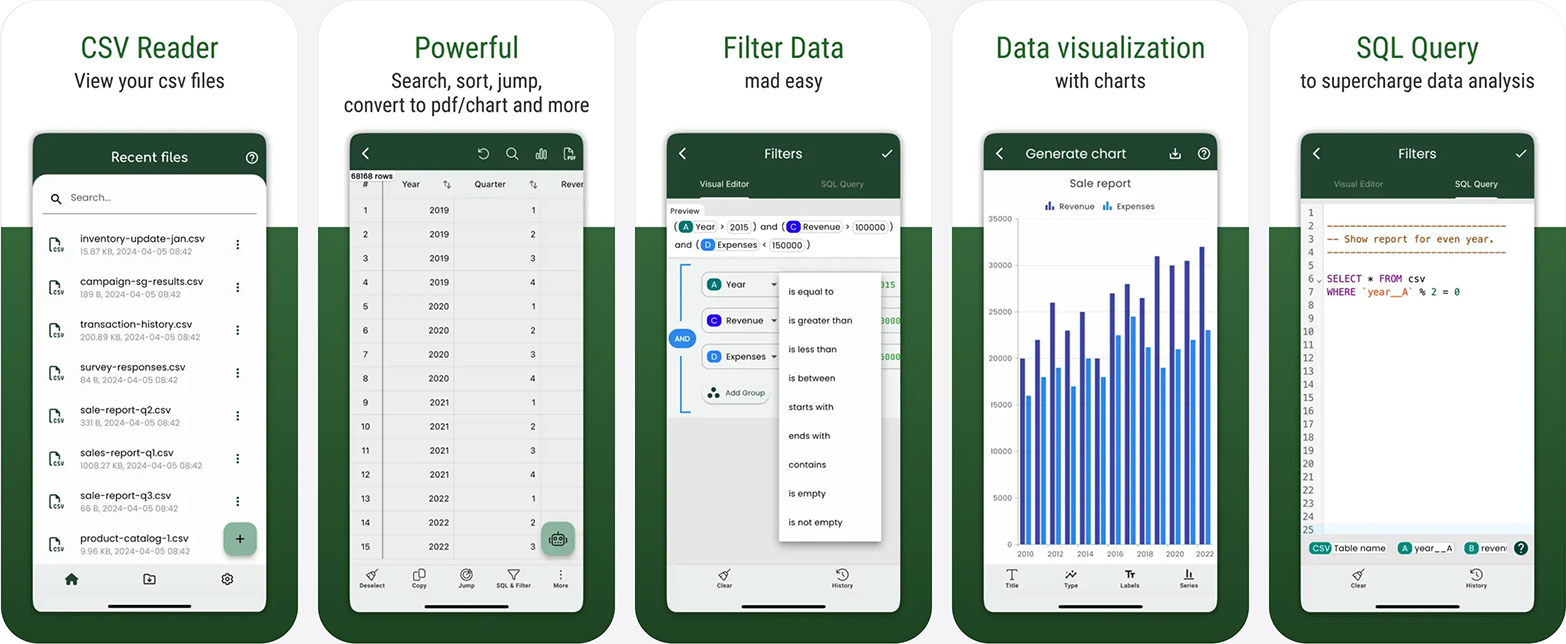
- Files open instantly after import, even those of large size.
- Supports both CSV and TSV file formats.
- Search your content, and copy the selected rows.
- Show a column of image URLs as actual images.
Query with AI or SQL
- Use the AI Assistant to query your CSV content in plain language.
- Analyse your data with SQL queries when you need to be exact.
- Filter without typing, using the Visual Filter Editor.
Chart, export and share
- Generate a chart image from your data.
- Convert to PDF, with custom data and styling for the export.
- Manage all the exported files and share them.
Questions
- What is the difference between CSV Viewer and CSV Editor?
- CSV Viewer is built for reading and interrogating a file (AI assistant, SQL queries, visual filters, charts and PDF export) and runs on both iOS and Android. CSV Editor is built for changing a file (spreadsheet-style editing, formula columns, undo and redo) and is iOS only.
- Can I ask questions about my data in plain language?
- Yes. The AI Assistant queries your CSV content directly, so you can ask about what is in the file rather than building a query by hand.
- Can I run SQL against a CSV?
- Yes. You can analyse your data with SQL queries, or use the Visual Filter Editor if you would rather build the filter without writing any.
- Can I export to PDF?
- Yes. A CSV can be converted to a PDF with custom data and styling, and every exported file is managed in the app so you can share it later.
- Does it open TSV files?
- Yes. Both CSV and TSV file formats are supported.
Try it in the browser
Free, nothing uploaded, no account — and a fair way to find out whether this is the kind of tool you want on your phone.
- Open a CSV file in your browserDrop a file in. It opens here, and it stays here.
- Run SQL on a CSV fileReal SQL, on your file, without installing a database.
- Merge CSV files into oneSeveral files in, one file out, columns matched by name.
- Remove duplicate rows from a CSVDuplicates on the columns you say identify a row.
- Compare two CSV filesAdded, removed, changed, matched on a key rather than line by line.
- Convert a CSV to PDFA CSV, laid out as a readable table, saved as a PDF.
Guides
- How to compare two CSV files and find what changeddiff compares lines, so a re-sorted export looks entirely rewritten. Here is how to compare by key instead: what is new, what is gone, what changed.
- How to convert a CSV to PDFA CSV has no page and a PDF is nothing but pages, which is why columns fall off the edge. Here is how to decide what goes in before you convert.
- How to remove duplicate rows from a CSV fileMost duplicates are two records for one person rather than identical lines, and one of them is newer. Here is how to find them and keep the right one.
- How to merge multiple CSV files into oneConcatenation matches columns by position, so one file with a different header order quietly ruins the result. Here is how to merge by name, and verify it.
- Why Excel crashes on large files, and what to do insteadNot responding, frozen on scroll, dead on save. The cause is usually memory, recalculation and formatting rather than the row count. Here is how to tell which one.
- How to open a 1GB CSV file (2026 guide)A gigabyte is where most tools stop being honest about what they can do. Here is what opens a 1GB CSV, what it costs in RAM, and what quietly truncates.
- How to run SQL queries on a CSV file without a database (2026 guide)You do not need Postgres to run a GROUP BY. Here is how to query a CSV in place with DuckDB, SQLite, q or your phone, and which one fits which situation.
- How to open a large CSV file that Excel won't open (2026 guide)Excel stops at 1,048,576 rows, and sometimes truncates without telling you. Here is how to open, read and edit a huge CSV file on desktop, and on a phone.
- How to fix a broken or malformed CSV fileEverything in one column, stray quotes, rows that split in half, mojibake in the names. Here is how to diagnose what is actually wrong with a CSV, and repair it.
- How to convert a CSV to Excel on a phoneYou have a .csv on your phone and someone wants an .xlsx back. Here is how to convert it on iOS or Android, and how to avoid the ways the conversion mangles data.
- CSV vs XLSX: which format to use, and whenCSV is a text file with commas in it. XLSX is a compressed application file. That difference decides everything: size, formulas, dates, and who can open it.
- The best free ways to view a CSV file on Android (2026 guide)Most free Android CSV apps are ad-heavy, truncate large files, or are Google Sheets in disguise. Here is what each option actually does, and where each one breaks.
- How to open a CSV file on iPhone and iPad (2026 guide)Tapping a CSV in Files or Mail shows a wall of raw text, or nothing at all. Here is why that happens on iOS, and every route to actually reading the file.