Habit Tracker: 30Day Challenge
Any goal, turned into a 30-day challenge.
- 30-day challenge grid
- Widgets & Control Center
- Heatmap & streak stats
- Offline, no account
Why it exists
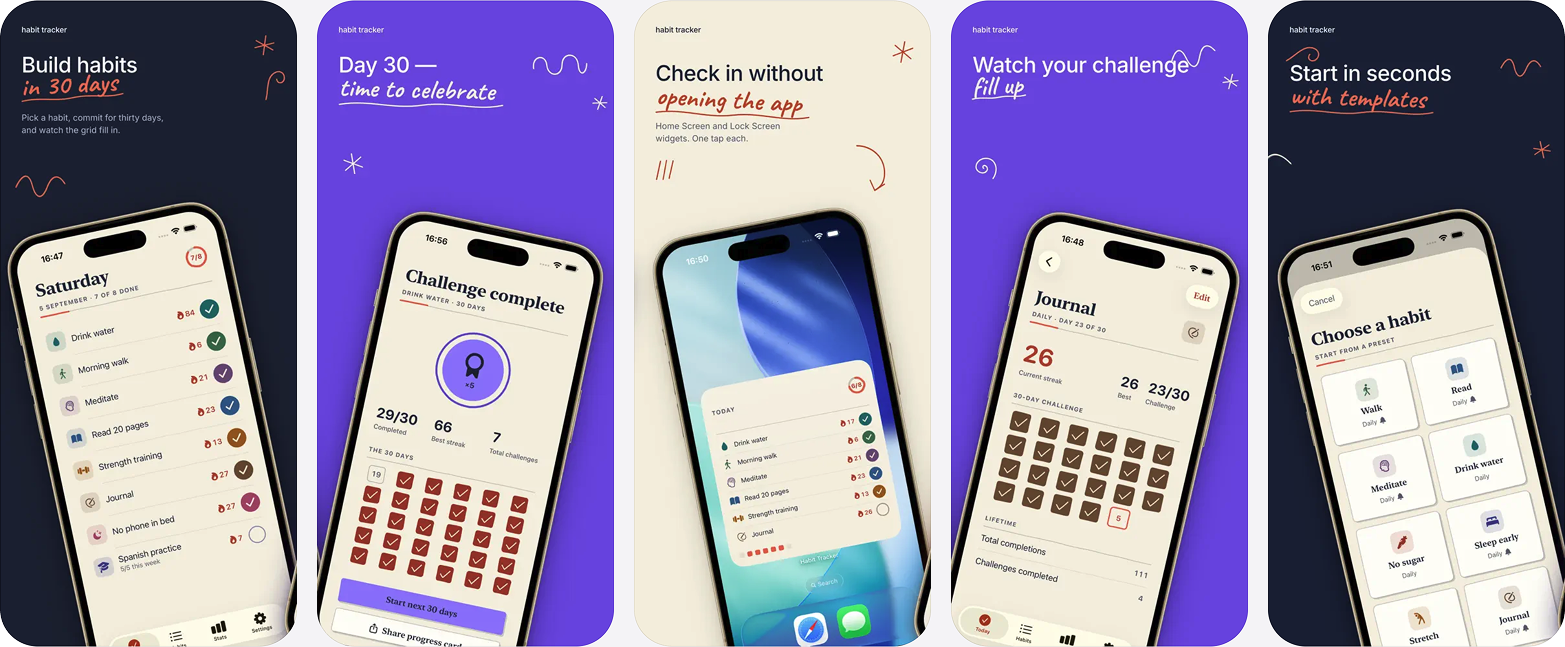
A month is long enough for a habit to stick and short enough to actually finish, so every habit here gets its own 30-day grid rather than an open-ended list that only ever grows. It is drawn as ink on paper, with hand-drawn check marks and a grid that fills in, and it runs entirely on the device: no account, no cloud, nothing to sign into before you can write anything down.
Build your routine in seconds
- Start from ten ready-made templates: drink water, workout, read, meditate, journal and more.
- Or create your own with 60+ icons and a full colour palette.
- Flexible schedules: every day, specific weekdays, or X times per week.
- Drag and drop to reorder the list.
Stay on track
- Streaks that respect your schedule: rest days never break them.
- Per-habit reminders, plus an optional evening summary that only fires if something is left unchecked.
- Mark a habit done straight from the notification.
Check in without opening the app
- Home Screen widgets in small, medium and large, with one-tap check-in.
- A Control Center control for instant access.
- Siri and Shortcuts support, so “Check off Drink Water” just works.
See your progress
- A GitHub-style yearly heatmap.
- Weekly bar charts and completion rates.
- Per-habit stats and perfect-day tracking.
- Confetti on perfect days, streak milestone toasts, and haptics on every check-in.
Private by default
No account, no cloud, no tracking; everything stays on your iPhone. Export a full JSON backup or a CSV of every check-in whenever you like; that is never gated behind a purchase.
Made to be usable
VoiceOver support, colour-blind-safe design, Reduce Motion respected, light and dark mode, in English and Tiếng Việt.
Questions
- Why 30 days?
- A month is long enough to make a habit stick and short enough to actually finish. Every habit gets its own 30-day grid, and completing one ends with confetti, a recap of your stats and a shareable achievement card.
- Does it need an account or an internet connection?
- No. It is fully offline and private: there is no account and no cloud, and your data stays on your iPhone.
- Can I check in without opening the app?
- Yes. Home Screen widgets in three sizes offer one-tap check-in, there is a Control Center control, and Siri and Shortcuts work too. You can also mark a habit done straight from its reminder notification.
- What is free and what needs Pro?
- Free forever: three habits, daily schedules, streaks, the 30-day grid, templates, a reminder and a small widget. Pro unlocks unlimited habits, weekday and times-per-week schedules, all icons and colours, unlimited reminders, the full stats charts, and the medium and large widgets plus the Control Center control.
- Can I get my data out?
- Yes, and it is never gated. Export a full JSON backup for import later, or a CSV of every check-in for your own analysis.
Guides
- How to restart a habit after breaking itA missed day costs almost nothing; the response to it costs the habit. Here is how to tell resuming from restarting, and what actually broke.
- How long it actually takes to form a habitThe 21-day rule comes from a 1960 book about plastic surgery. The research says a median of 66 days, with a range of 18 to 254. The range is the useful part.
- Habit tracking without notifications: a quieter methodReminders stop working the moment you learn to swipe them away. Here is how to build habit tracking that runs on placement and review instead of alerts.
The other apps
 JSON Editor: Smart JsonOne JSON document, three views that all edit.Read more
 Mind Map: Smart MindAI mind maps that never leave your device.Read more
 CSV Editor - Smart CSVOpens the CSV files other apps choke on.Read more
 CSV File Viewer - Smart CSVRead, query and chart any CSV. AI assistant included.Read more